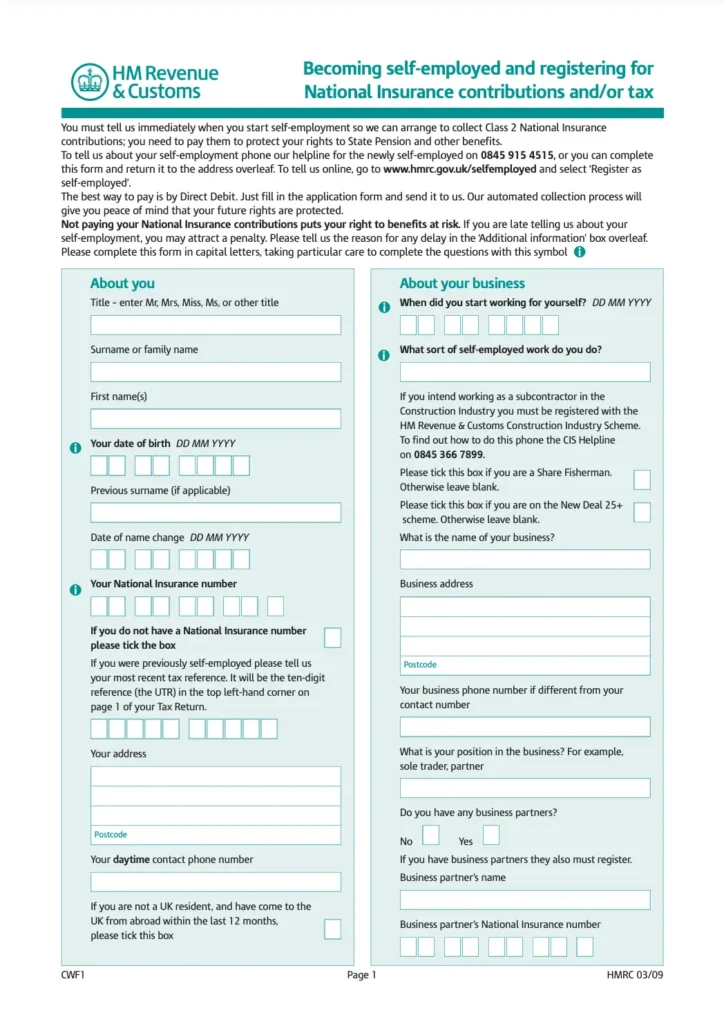
What Is a CWF1 Form?
UK self-employed people register with HMRC using the CWF1 Form. The “Self-Assessment Registration for Self-Employed” is the first crucial step in establishing your lone trader tax identity. When you become self-employed, whether full-time or part-time, you must inform HMRC. HMRC receives the CWF1 Form when you start working for yourself and must enrol in Self Assessment. It also registers you to pay Class 2 National Insurance, which helps you get the State Pension. Freelancers, gig economy workers, consultants, and workers need this form. After receiving your registration, HMRC will provide you with a Unique Taxpayer Reference (UTR), a 10-digit identifier for filing your yearly tax returns. Without a CWF1, you are invisible to the tax system as a self-employed individual, risking fines and missing benefits. Staying compliant and stress-free requires early registration.Who Needs to Submit a CWF1 Form?
There is a good chance you need to fill out a self employed registration form if you work for yourself instead of a company. People who are self-employed, which can mean a lot of different work arrangements, need to fill out this form.Sole Traders
Anyone who wants to start their own business as a sole trader needs to fill out a CWF1 and send it to HMRC. No matter if you are running a restaurant, doing web design, or selling your own handmade goods, you need this form to make your business legal.Freelancers and Gig Workers
People who work as freelancers (like writers, artists, or experts) and in the “gig economy” (like Uber drivers or delivery riders) are also self-employed. You still have to pay your taxes even if you work through apps or websites.Contractors Outside PAYE
You are responsible for your own taxes if you work for clients on a contract basis and are not on their payroll. This means you need to register through a CWF1.Self-Employment vs. Side Income
It does not matter if you work from home sometimes; you still need to register if you make more than £1,000 a year from it. How much money you make outside of PAYE is what matters, not how many hours you work.When Should You Submit the CWF1 Form?
Please submit your register as self employed form within three months of commencing self-employment. HMRC sets this deadline to help new sole traders and freelancers register quickly and pay taxes and Class 2 National Insurance. Even if your income is minor or you have not generated a profit, failing to register within this deadline might result in severe penalties. HMRC wants to know when you start business, not when you make your first big payment. Your start date is the first day you started a company to make money. For example:- Uber drivers must register when receiving fares.
- When displaying products for sale on Etsy, sellers must register to earn.
- Freelance consultants must register when receiving a paid customer or offering services.
How to Complete and Submit a CWF1 Form
It is easier than you think to fill out the HMRC form CWF1 if you split it into smaller steps. Here’s the right way to do it the first time:1. Create a Government Gateway Account
You will need to make a Government Gateway account before you can send your CWF1 form online. You can use this account to get to HMRC’s online services, such as records for Self Assessment and National Insurance.- Go to www.gov.uk/log-in-register-hmrc-online-services to do this.
- Pick the choice to sign up as a person
- Set up your username, password, and rescue information by following the on-screen instructions.
2. Gather the Required Information
Before you start the CWF1 form, make sure you have these things ready:- NIN (National Insurance Number), you need this to register.
- Date your business started, the exact day you started doing business.
- A short description of your business, such as “freelance writer” or “landscape gardening.”
- Information about you, name, date of birth, location, phone number.
3. Register for Class 2 National Insurance Contributions
As part of the CWF1 process, HMRC will register you immediately for Class 2 National Insurance contributions. This is what self-employed people who make more than the threshold have to do. These payments help you get state benefits like the State Pension and the Maternity Allowance. It is often worth it to pay freely to maintain your record, even if your wages are low. After you submit your form, HMRC will handle it and mail you your Unique Taxpayer Reference (UTR).Online vs. Paper CWF1 Form
You can send your CWF1 form in two ways: online submission or on paper form. It is a good idea that HMRC strongly suggests going online. It works faster, is safer, and lets you keep digital track of your application. You will also get your Unique Taxpayer Reference (UTR) faster, usually in 10 days. People usually only fill out the paper form in certain situations, like when they can not set up a Government Gateway account or are having trouble accessing online services. Additionally, it works for people who like to keep records on paper. Go to www.gov.uk/government/publications/self-assessment-register-if-youre-self-employed to get the CWF1 on paper. After filling it out, mail it to the address on the form. You can still submit an important information paper, but the fastest and safest way is to do it online. Most self-employed people should use this method.What Happens After Submission?
HMRC will start working on your application to register you as self-employed as soon as you submit your CWF1 form, whether you do it online or by mail.- Confirmation from HMRC: When you send something online, you will usually see proof immediately. For paper records, give HMRC a few extra days to let you know they got them.
- Receive Your Unique Taxpayer Reference (UTR): HMRC will mail you a letter with your Unique Taxpayer Reference (UTR) within 10 working days (or 21 if you are outside of the UK). You will use this 10-digit number when you file your Self Assessment tax forms. It is important to keep it safe.
- Self Assessment Is Activated: Your Self Assessment account will be ready to use as soon as you get your UTR. Now that you have your Government Gateway login information, you can start taking care of your tax responsibilities.
- What to Do Next:
- Write down the due dates for your Self-Assessment and payment
- Set up the way you keep records and do bookkeeping for your business.
- To stay aligned, you might want to work with an accountant or counsellor.